All your service, human or AI-driven, in one single place
Centralize calls, WhatsApp, chat, and social media, and decide how to handle each interaction: with your team, with AI, or both working together.
Agents Connected: 42
Simultaneous Chats: 184
“I've generated a response suggestion for the billing query...”
Target SLA: 98.0%
Human, autonomous or hybrid service
You decide what people handle, what the AI resolves, and when an interaction should transfer from one to the other.
Human service
For conversations that require judgment, negotiation, specialized knowledge or a more personal touch.
Autonomous service
For processes that AI can handle from start to finish using defined rules, information and integrations.
Hybrid service
AI can start the interaction, gather details and transfer the conversation to a person with all the context available.
Contact or receive through the right channel
Organize inbound and outbound service by campaigns, and define how to contact each customer: via WhatsApp, call or automatically according to your rules.
How it is organized
Inbound or outbound
Receive conversations or contact your customers depending on the goal of each campaign.
By department, service or business line
Separate the operation by product, location, customer or process, with its own resources and rules.
By skills
Assign each interaction to the people or AI agents best equipped to handle it.
By the most suitable channel
In outbound campaigns, define if you contact via WhatsApp or call, automatically or by selecting each contact.
With automatic dialing
Automate outbound calls without dialing number by number.
With bulk WhatsApp sends
Contact a complete database and define what happens when someone replies: human service, a specific campaign, or an AI agent.

Serve through the channel your customer prefers
All your channels centralized to work with more order, traceability and speed.
Multi-agent WhatsApp Business
One WhatsApp, all your team
Several agents can serve the same number with history, templates, distribution and transfers, maintaining traceability of each conversation. You can also use flow bots to gather information, guide the conversation or route it before handing it over to a human or AI agent.
Telephony
Calls with total control
Manage inbound and outbound calls with forms, rules, recording, supervision and reports.
Chat and digital channels
All your chat, in the same operation
Centralize web chat and other enabled digital channels without leaving One.
Facebook and Instagram
Your social networks, in the same queue
Receive and manage Facebook and Instagram conversations from a centralized operation.
Each client's details, always at hand
Access details, history and interactions from One and have the context ready when a new conversation arrives.
History per contact
Review calls, chats and previous actions from a single profile.
Context when serving
Relevant information appears when a new interaction arrives, without searching in other screens.
Custom details
Save the details needed for each workflow using configurable fields and forms.
No external CRM needed
One includes a contacts database to manage your clients' necessary details.
Connect the CRM you already use
Integrate other tools via API and available integrations.
Marty McFly
Custom Fields (Campaign)
Activity History

Oper: the workspace where your team actually serves
A single place to manage calls, chats, history and transfers, without hopping between screens or losing the context of each conversation. With integrated Copilot in every interaction.
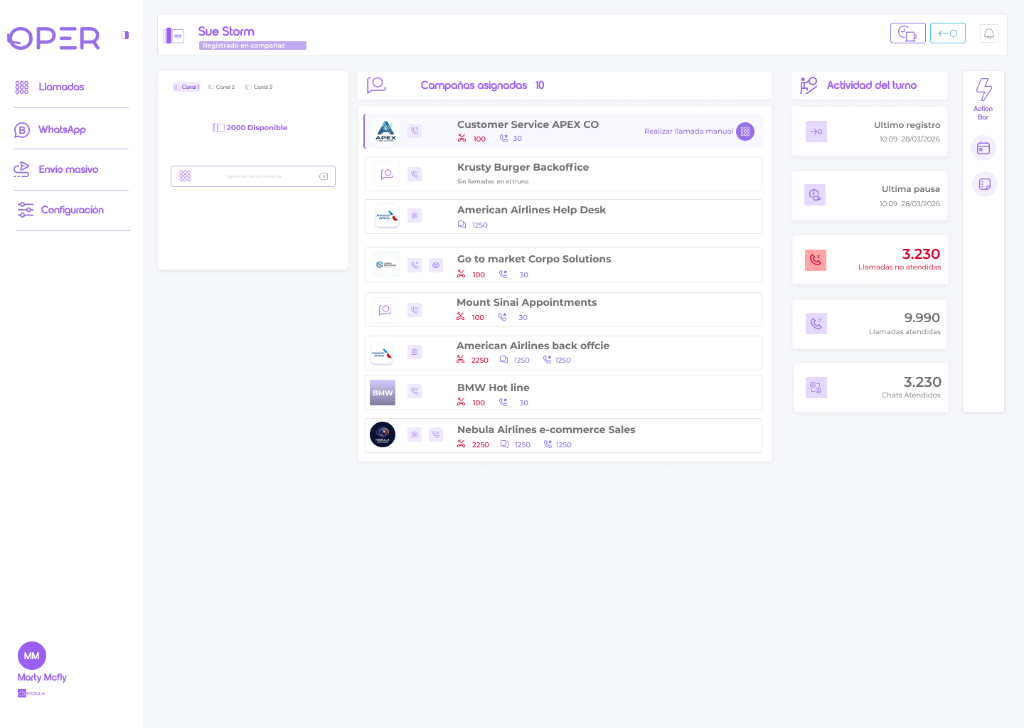
All to serve
Omnichannel inbox · History · Statuses and breaks
Manage every interaction from the same space.
Context on-screen
Contact details · Forms · Quick replies
All information appears right when you need it.
Organized operation
Assigned workflows · Transfers · Power dialer
Less friction to serve better.
Integrated Copilot
Suggestions · Summary · Translation
AI that accompanies every interaction.
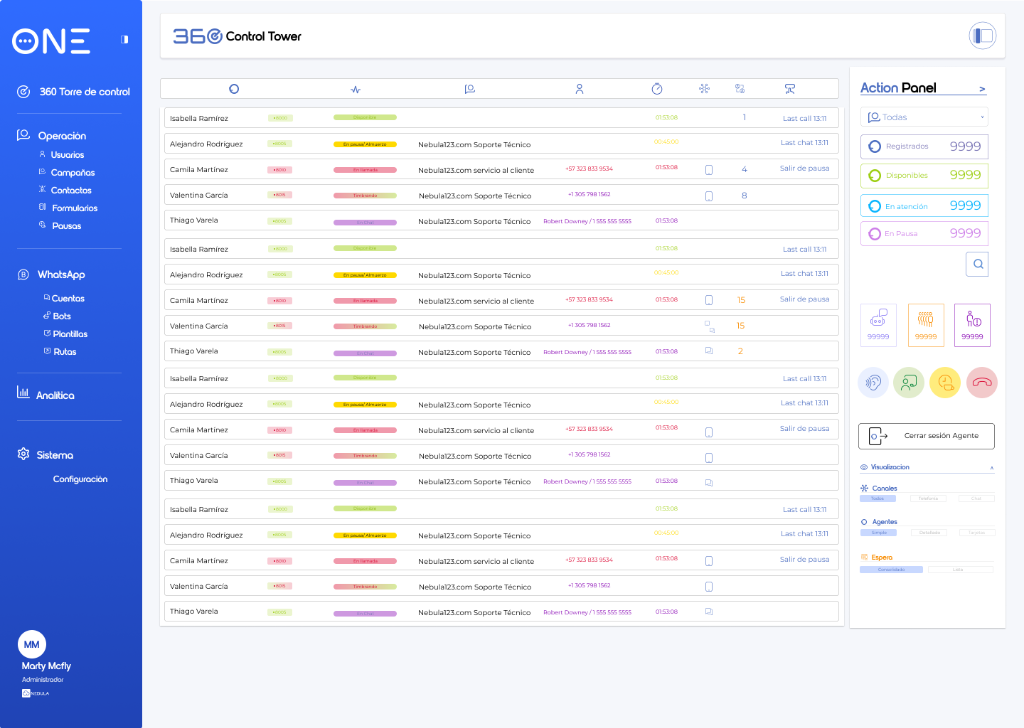
At a glance
- Active campaigns
- Connected agents
- Ongoing calls and chats
- Service level
Supervise in real-time
- Online calls and chats
- Live coaching
- Queue time control
- Operational alerts
Take action
- Pause or disconnect sessions
- See who is operating
- Train the team
- Monitor drop-offs
Control Tower: supervise and monitor your operation
While service takes place from Oper, Control Tower lets you supervise, coach and monitor your team in real-time from a single dashboard.

AI integrated into your operation
Nebula AI enhances One with autonomous service, real-time assistance and intelligence over every conversation.
Voice and chat AI agents
Attend complete processes, gather information, execute actions and transfer to a person when needed.
AI Copilot
Supports in real-time with suggestions, writing, context, translation, transcription and summaries.
Conversational intelligence
Analyzes calls and chats to identify sentiment, intent, topics and signals requiring follow-up.
Knowledge base
Centralizes information, instructions and rules that your AI capabilities use.
AI capabilities use Nebula AI Tokens based on the contracted configuration.
Learn about Nebula AI →Visualize what is happening in your operation
Check activity, timing, quality and results in real time and historically from a single environment.
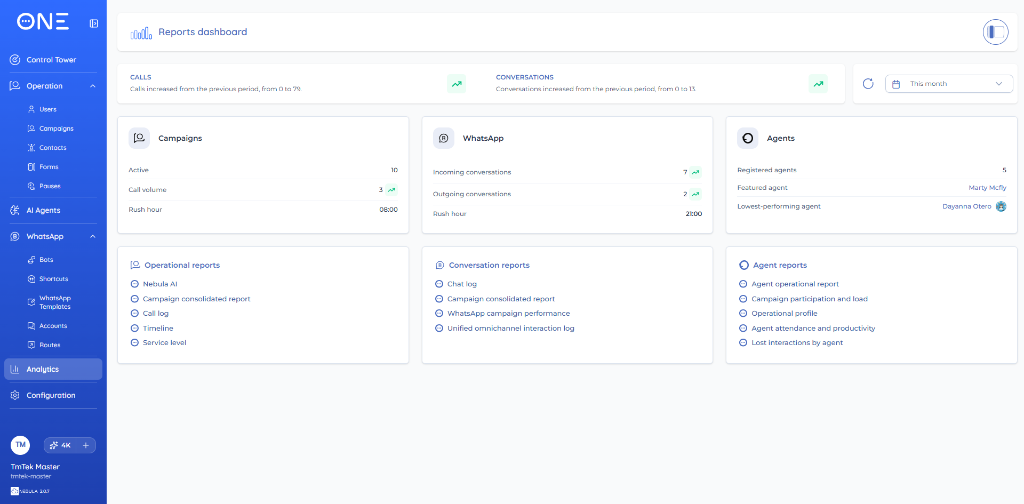
General view of the operation
Interactions · Service level · Satisfaction · Load by channel · Productivity · AI usage
Operation and campaigns
Campaigns summary · Timeline · Service level · Calls log
Conversations
Chats log · WhatsApp · Omnichannel log · Interactions history
People and productivity
Operational activity · Campaign participation · Attendance · Productivity · Missed interactions
Quality and analysis
Likert satisfaction surveys · Nebula AI · Power BI integration
See all available reports
- Campaigns consolidated report
- Calls log
- Timeline
- Service level
- Nebula AI analytics
- Chats log
- WhatsApp campaigns performance
- Unified omnichannel interaction log
- Agent operational report
- Agent participation and load per campaign
- Operational profile
- Agent attendance and productivity
- Lost interactions by agent
- Likert-type satisfaction surveys
- Power BI integration

Choose how you want to start

One Start
Telephony or WhatsApp
Start with the main channel of your operation: calls or multi-agent WhatsApp.

One Pro
Telephony + WhatsApp
Unify calls and WhatsApp in a single operation, with more control and traceability.

One Max
Telephony + WhatsApp + Facebook + Instagram
Integrate calls, messaging and social networks for a more complete omnichannel service.
Nebula AI can be enabled according to the selected plan and configuration. Its consumption is managed via Nebula AI Tokens. AI agents can serve on enabled voice or chat channels; Nebula AI is a transversal capability and does not count as an independent channel.
Frequently Asked Questions
Does One Start include telephony and WhatsApp at the same time?+
One Start is designed to begin with one of the two main channels: telephony or WhatsApp. If you need both in the same operation, you can use a plan that integrates them.
Is Nebula One only an artificial intelligence solution?+
No. One is an omnichannel service platform that manages channels, campaigns, people, automation, supervision and reports. AI is an integrated capability within the operation.
Can I serve with people and AI agents?+
Yes. You can configure processes served by people, by AI agents, or using a hybrid model where both participate in the same interaction.
Do AI agents only answer frequently asked questions?+
No. They can execute complete processes using the rules, information and integrations configured for each operation.
Is the use of AI agents unlimited?+
AI capabilities use Nebula AI Tokens and their consumption depends on the features used and the contracted configuration.
Are Meta charges included?+
Charges associated with Meta, messaging and templates are managed separately when applicable.
Are telephony minutes included in Nebula AI Tokens?+
No. Tokens correspond to AI consumption. Minutes, destinations and telephony phone lines are managed independently.
Do I need a CRM to use One?+
No. One includes a contacts database where you can keep details and history of each customer and view them when serving. If you already use a CRM, you can also connect it via API or available integrations.
Can I integrate One with other tools?+
Yes. One has APIs and integrations to connect with CRM and other applications according to the capabilities of each system.
Not sure which plan is for you?
Tell us how your team operates today and we'll help you find the right setup — no matter your company's size.